| Introduction | In this lecture we will continue our discussion of inheritance by examining exceptions more closely: the two are closely linked, and up till now we could not truly understand the meaning/use of exceptions, although we were still able to use them effectively if only naively. Specifically, we will first learn that all the exception classes are arranged in a massive hierarchy; knowledge of this hierarchy is useful in a detailed understanding how catch works. We will also examine the difference between how checked and unchecked exceptions are declared and processed by the Java compiler (there is no runtime difference). Finally we will learn how two write exception classes and re-throw exceptions. |
| The Throwable Inheritance Hierarchy |
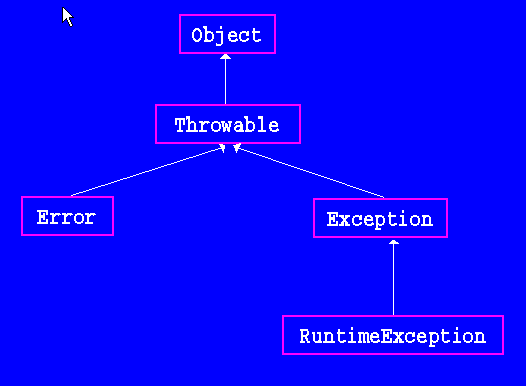
Here is a diagram of the most prominent classes in the inheritance hierarchy
that Java uses for throwing exceptions.
Below is a much longer -but still not complete- list of the the first four levels in this hierarchy; indentation indicates the subclass relationship: e.g., the Error class is a subclass of Throwable (and the Throwable class itself is a subclass of Object). For an objects to be throwable (e.g., throw new ...), it must be constructed from some class in the Throwable hierarchy (either Throwable or one of its subclasses). The Throwable class itself declares two constructors (one with a message String, one without), and a few interesting methods (getMessage and various overloaded versions of printStackTrace) that are inherited in sublcasses and often called when exceptions are caught). The top three classes in this hierarchy (the Throwable, Error, and Exception classes) are all defined in the java.lang package (which is automatically imported into every class file). Many other exceptions are also defined in this package, while others are defined elsewhere (e.g., IOException is defined in the java.iopackage; EmptyStackException is defined in the java.util) package. Many of the exceptions that we have seen are under the hierarchy: Throwable, Exception, RuntimeException. I compiled the following list by visiting the JavaDoc pages in Sun's API and doing lots of copying and pasting. As you can imagine by the length of this list of built-in classes, exceptions are central to the Java language. Understanding how to throw and catch exceptions is intergral to understanding Java and and how to program in it. Note that the prime reason that so many different exception classes exist is their different names. The names are used in try/catch statements to decide selectively which exceptions to catch, and how to process these exceptions differently. When we define new classes whose methods throw exceptions, we can throw any of the exception classes already written, or we might want to define new exception classes, and by throwing them signal some special failure in the ability of methods to perform their required actions. Throwable
Error
AWTError
LinkageError
ClassCircularityError
ClassFormatError
ExceptionInInitializerError
IncompatibleClassChangeError
NoClassDefFoundError
UnsatisfiedLinkError
VerifyError
ThreadDeath
VirtualMachineError
InternalError
OutOfMemoryError
StackOverflowError
UnknownError
Exception
AclNotFoundException
ActivationException
UnknownGroupException
UnknownObjectException
AlreadyBoundException
ApplicationException
AWTException
BadLocationException
ClassNotFoundException
CloneNotSupportedException
ServerCloneException
DataFormatException
ExpandVetoException
FontFormatException
GeneralSecurityException
CertificateException
CRLException
DigestException
InvalidAlgorithmParameterException
InvalidKeySpecException
InvalidParameterSpecException
KeyException
KeyStoreException
NoSuchAlgorithmException
NoSuchProviderException
SignatureException
UnrecoverableKeyException
IllegalAccessException
InstantiationException
IntrospectionException
InvalidMidiDataException
InvocationTargetException
IOException
ChangedCharSetException
CharConversionException
EOFException
FileNotFoundException
InterruptedIOException
MalformedURLException
ObjectStreamException
ProtocolException
RemoteException
SocketException
SyncFailedException
UnknownHostException
UnknownServiceException
UnsupportedEncodingException
UTFDataFormatException
ZipExcept
LastOwnerException
LineUnavailableException
MidiUnavailableException
MimeTypeParseException
NamingException
AttributeInUseException
AttributeModificationException
CannotProceedException
CommunicationException
ConfigurationException
ContextNotEmptyException
InsufficientResourcesException
InterruptedNamingException
InvalidAttributeIdentifierException
InvalidAttributesException
InvalidAttributeValueException
InvalidNameException
InvalidSearchControlsException
InvalidSearchFilterException
LimitExceededException
LinkException
NameAlreadyBoundException
NameNotFoundException
NamingSecurityException
NoInitialContextException
NoSuchAttributeException
NotContextException
OperationNotSupportedException
ReferralException
SchemaViolationException
ServiceUnavailableException
NoninvertibleTransformException
NoSuchFieldException
NoSuchMethodException
NotBoundException
NotOwnerException
ParseException
PartialResultException
PrinterException
PrinterAbortException
PrinterIOException
PrivilegedActionException
RemarshalException
RuntimeException
ArithmeticException
ArrayStoreException
CannotRedoException
CannotUndoException
ClassCastException
CMMException
ConcurrentModificationException
EmptyStackException
IllegalArgumentException
IllegalParameterException
IllegalThreadStateException
NumberFormatException
IllegalMonitorStateException
IllegalPathStateException
IllegalStateException
ImagingOpException
IndexOutOfBoundsException
MissingResourceException
NegativeArraySizeException
NoSuchElementException
NullPointerException
ProfileDataException
ProviderException
RasterFormatException
SecurityException
SystemException
UndeclaredThrowableException
UnsupportedOperationException
SQLException
BatchUpdateException
SQLWarning
TooManyListenersException
UnsupportedAudioFileException
UnsupportedFlavorException
UnsupportedLookAndFeelException
UserException
AlreadyBound
BadKind
Bounds
Bounds
CannotProceed
InconsistentTypeCode
Invalid
InvalidName
InvalidName
InvalidSeq
InvalidValue
NotEmpty
NotFound
PolicyError
TypeMismatch
UnknownUserException
WrongTransaction
The class Error and its subclasses indicate something wrong with Java
itself.
It is recommended that programs not throw, or attempt to catch, these errors,
but instead let Java itself throw and terminate any program throwing them.
Thus, we have and will continue to focus on the class Exception and
the subclasses its hierarchy.
Here is a Javadoc page for the IllegalArgumentException class. Notice its package, its superclasses, and its known (to the standard Java library) subclasses.
Also notice that this class specifies two constructors (as all exception class should): one parameterless and one with a String parameter, which should have message as its parameter's name. Notice too that none of the superclasses of this class (except Throwable, which defines getMessage and various stack tracing methods), define any methods that this class inherits. The getMessage method returns String parameter (the generic name s; it should be message) used in the second constructor. So, if they define no new methods, why do all these intervening classes exist? They exist solely to form an inheritance hierarchy, whose use in Java is described below. |
| Catching Exceptions in a Hierachy |
There are three simple, salient, and related facts about catch
clauses that we can now fully explore because of our knowledge of
inheritance.
We can explain these features in detail here, although a naive understanding
of them is often enough to do simple exception processing in programs
(like the standard way that we read files, using the EOFException
to indicate nothing else to read).
First a catch clause catches an exception if the thrown object is an instanceof the type that is specified in the catch clause. Thus, given the hierarchy above, the clause catch (RuntimeException re){...} will catch thrown objects constructed from the RuntimeException class, as well as any thrown objects constructed from any subclasses of RuntimeException (of which there are a huge number). Second, the identifier re acts like a parameter variable in the block associated with the catch clause: Java initializes it to refer to the caught object. Thus, inside the block we can refer to this variable: e.g., call methods on it: re.getMessage() (whose method is defined in the Throwable class and inherited by all its subclasses). Of course, if the object thrown is an instance of RuntimeException, then the assignment of a reference to re will work by implicit upcasting. Most often, though, the variable is not used in the associated block; it is enough to know which class of exception is thrown. Typically, I name this variable in all lower-case letters, using the upper-case letters in the class name. Sometimes we will write a catch clause specifying the IOException type, which catches EOFException objects, as well as others that cause I/O to fail (EOFException is a subclass of IOException). By specifying a type high up in the inheritance hierarchy, a catch clause can catch many different exception classes in the hierarchy. Third, Java checks the catch clauses sequentially. Thus, if I specify catch (EOFException eofe){...}
catch (IOException ioe) {...}
Then an EOFException will be caught by the first catch clause
while all other exceptions that have IOException as their
superclass (or IOException itself) are caught by the second
catch clause.
Note that because of this sequentiallity, it would be "silly" to write catch (IOException ioe) {...}
catch (EOFException eofe){...}
because a EOFExeption would be caught by the first catch
clause, before ever reaching the second.
In fact, the Java compiler knows this too, and would detect and report an
error if these clauses appear in this order -with one blocking the use
of a later one; this is similar to its "unreachable code" message, which
indicates that some use of control structures makes it impossible to
execute some line of code: as in return 0; return 1;.
These three features give us precise control over how exceptions are caught and processed. Again, this control becomes necessary only in complicated applications that must accurately diagnose and safely recover from all kinds of problems. |
| Checked and Unchecked Exceptions |
Java exception classes (we will ignore errors here, and focus on exceptions)
are categorized as either "checked" or "unchecked".
These categorization affect compile-time behavior only; they are handled
identically at runtime.
We (and Java) can easily determine in which category each exception is
defined.
So, how does the compiler treat "checked" exceptions more carefully? In one simple way: if the code in a primary method calls a secondary method that can throw a checked exception, then the primary method must catch the exception or specify that exception in the throws part of its header. If it fails to provide either of these options, the Java compiler will detect and report an error. There are no such restrictions on unchecked exceptions. The purpose of the throws part of a method definition is to make clear to anyone calling the method what exceptional circumstances the method might detect but not be able to handle internally. These details are important to any programmer who wants to write code that calls such a method. So why are unchecked exceptions treated differently? This is subtle question. The best answer that I have read is that these exceptions are mostly caused by programmers writing incorrect code. On the other hand, checked exceptions are caused by external conditions, beyond the control of the programmer. For example, the IndexOutOfBoundException is an unchecked exception. Typically, if this exception is thrown, it is because the programmer has written an incorrect loop that access the array at some illegal index. There is little reason for the program to try to detect such errors and catch them, or to propagate them out of the method in which they occur to be caught by other methods. Best to have Java automatically catch such exceptions and print an error message including a stack trace, so that the programmer can try to fix the bug. A stack trace, printed in the console window, starts with the exception message and the method name, line number, and file name where the exception was thrown. Next comes the method that called this one (and from which line number in which file). This continues until the main method is reached (and the line number it was executing and the file in which it was in). That is the last line in the trace. In contrast, EOFException is a checked exception. When it is thrown, it is not because the programmer wrote incorrect code (we cannot even check "is there another datum in the file"; we have to commit to trying to read one and then learn of the result), it is because external conditions do not allow another value to be read from a file. So, one way to distinguish these exceptions is by the "source" of the error: whether it is internal or external to the program's code.
There are some code examples that blur this distinction.
We could use the following code to add up all the values in an array
int[] a.
Another reason for the distinction is that unchecked exceptions can occur in any statement that accesses a member of an object (NullPointerExceptions). Thus, to avoid cluttering up method definitions, such exceptions do not have to be caught or listed after throws. Certainly we can list these exceptions after throws (and I often do) to indicate that the method might be thrown, but the Java compiler does not require it. When programmers write a new exception class in Java, it should probably be a subclass of Exception, not RuntimeExeption. This approach is very strongly advocated in the Java Language Reference Manual. In fact, although we have studied many exceptions that are subclasses of RuntimeException (because they are intimately related to the semantics of Java's language elements), most exceptions in the large list above are checked exceptions. Download a small program that defines new checked and unchecked exceptions, and illustrates how the Java compiler treats them differently. It is stored in Exception Demonstration. |
| Writing New Exception Classes |
It is simple to define a new exception class.
First, we must decide whether it should be a subclass of some other
exception: if so we extend that class; if not we need to decide
whether it should be a checked or unchecked (see the discussion above),
extending Exception or RuntimeException respectively.
The class should have the two standard constructors for exception classes
(whose bodies just call super), and define no other fields or
methods.
That's it (unless you want to do something very non-standard).
It would look something like this.
public MyException extends Exception
public MyException()
{super();}
public MyException(String message)
{super(message);}
}
|
| Catching and Rethrowing Exceptions |
Sometimes it is useful in a method to catch an exception that has been
thrown, process it a bit in the method itself, and then rethrow the same
(or a different) exception.
Note that writing
catch (RuntimeException re)
{
System.out.println("Runtime exception: " + re.getMessage();
throw re;
}
tells Java to catch any RuntimeException (or one of its subclasses),
print an error message, and then rethrow the same exception; here the
throw statement indicates to throw not a new exception, but whatever
exception object re now refers to.
Suppose that the class Item defines the following method public static Item readFromFile(TypedBufferReader tbr)
throws EOFException, IllegalStateException
This method either returns a reference to an Item, throws an
EOFException (if there are no more items to read), or throws an
IllegalStateException (if the data in the file is not what is
expected: that generalizes something like NumberFormatException).
Now suppose the class Database defines a load method that wants to read all the Items from a file into a database (storing them in an array, represented by db and used). We can write this method as public void load () throws IOException
{
TypedBufferReader tbr =
new TypedBufferReader("Enter name of file with items")
for(used=0;;used++)
try {
if (used == db.length)
doubleLength();
db[used] = Item.readFromFile(tbr);
}catch (EOFException eofe)
{break;}
catch {IllegalStateException ise )
{
System.out.println("Error reading Item in DB: "
+ ise.getMessage());
throw new IOException("load: Error reading file");
}
}
So, in the expected case, this method catches an EOFException and
terminates the loop and returns (successfully loading the database with
items).
But, if this method catches an IllegalStateException it first prints
an error, (including this exception's message).
Then this method itself throws an IOException (to be handled by
whoever calls this method).
This code is sophisticated, but it should not be beyond your capability to
understand.
|
| Problem Set |
To ensure that you understand all the material in this lecture, please solve
the the announced problems after you read the lecture.
If you get stumped on any problem, go back and read the relevant part of the lecture. If you still have questions, please get help from the Instructor, a TA, or any other student.
|